TL;DR: 3 Automations at a Glance
☝🏻Here’s exactly what we built (and what you can copy):
- Automation 1: Natural language lead entry — Anyone on the team types a simple
/leadcommand in Slack, Teams, or Cliq and the AI instantly creates or updates a clean CRM record with full duplicate protection. - Automation 2: Passive Listener — Every new lead (no matter how it enters the CRM) automatically spawns a dedicated relationship workspace in SharePoint, OneNote, or Google Drive with two-way links back to the CRM record.
- Automation 3: On-demand Sync Button — One click on any CRM record creates the same structured workspace when you want deliberate control instead of full automation.
Each automation stands alone, delivers ROI within weeks, and compounds into the foundation for the next 11 use cases. Total added cost for most firms: one automation platform subscription (or $0 if you’re already on Zoho One).
Every advisory firm we work with has the same ghost in the machine.
An advisor goes to a conference. Collects 20 business cards. Hands them to the ops associate Monday morning and says: "Can you get these in the CRM?"
By Thursday, twelve are entered. Three are duplicates of contacts already in the system. Two don't have email addresses because the handwriting was illegible. And one of those people — the one the advisor circled and said was the most promising conversation of the weekend — never made it in at all.
That lead is gone.
We've watched this happen at $2M firms and $15M firms. It doesn't matter how sophisticated your CRM is. If humans are typing every record in by hand, records are going to be wrong, late, incomplete, or missing. That's not a people problem. It's a process problem.
And in 2026, it's a solved one — with tools most firms are already paying for.
Last week I wrote about the firm that's already there. A top 50 RIA that's built 14 production AI use cases — not pilots, not experiments — all mapped directly to client relationship outcomes, and all being used to justify 22X acquisition multiples. The firms that don't have that infrastructure? They're leaving money on the table they don't even know exists.
That article was about the divide. This one is about crossing it.
You don't start with 14. You start with 3. And you can have all three running in a week — leveraging the tech stack you already have in place.
What follows is exactly that: three automations that address three of the highest-friction, highest-cost operational problems in any advisory firm.
They're not the whole picture. But they're a legitimate 3/14. And "legitimate start" is what separates the firms building momentum from the ones still watching from the sideline.
The Problem Is Bigger Than You Think
Manual data entry in financial advisory operations isn't a minor inconvenience. It's a documented operational crisis that costs firms real money, real leads, and real compliance exposure.
Call it what it actually is: The Admin Tax. That's the 10–15 minutes of manual CRM entry required after every networking event, every LinkedIn message, every referral email. It doesn't feel catastrophic in the moment. But it accumulates — and it quietly erodes the quality of your entire client database over time.
The research backs this up. A 2025 WealthTech Today analysis of AI adoption in RIA operations described the shift away from manual processes as "the silent revolution happening inside RIA ops teams." The firms pulling ahead aren't the ones with the biggest tech budgets — they're the ones that stopped tolerating avoidable manual work.
The cost shows up in four places most firms don't fully account for:
1. Duplicate records. Every CRM we've audited at a new client engagement has them. The same person appears as a Contact, a Lead, and sometimes both — with different phone numbers and different notes. Your pipeline reports are lying to you.
2. Missed follow-ups. If a lead doesn't get entered, the follow-up doesn't happen. There's no task created. No sequence triggered. The advisor assumes ops handled it. Ops assumed the advisor was going to add it. Nobody followed up. That prospect went somewhere else.
3. Compliance exposure. For RIA firms, documentation isn't optional. If a client interaction isn't logged, it didn't happen. Manual entry processes create gaps — not because people are careless, but because the friction of entry is high enough that shortcuts get taken.
4. Ops team burnout. Your operations associate didn't take that job to type names into forms. Data entry is the task that most reliably erodes morale at lean advisory firms. It's also the one that's most replaceable.
None of this is news. Every ops director at every RIA we've ever spoken to has nodded along to this list. The question was never whether to fix it. It was how — without adding another software subscription, another training initiative, or another workflow that only works when everyone follows the rules.
The Real Issue: Advisors Work in "Unstructured" Environments
Here's what makes this problem uniquely hard in financial advisory: advisors are high-touch, which means leads arrive in every format imaginable.
The Airplane Napkin. A quick text from a current client: "Hey, you should call my brother-in-law Dave, he just sold his business and has no idea what to do with the money." That's a hot lead. It's also a text message with no email, no last name, and no company.
The LinkedIn Deep Dive. An advisor spends 20 minutes researching a prospect. Career history, current role, mutual connections, shared interests. None of it is in the CRM yet — because copying it in requires opening seven different fields and typing it manually.
The Email Signature. A referral sends an introduction email. The prospect's phone, title, and company are buried in a three-line email footer. To capture it, someone has to open the CRM, create a new record, and paste it in field by field.
In every one of these scenarios, most CRM systems demand the same thing: open a new lead tab, fill out 6+ individual fields, and save. That's a 5-minute process performed dozens of times a week.
The solution turns it into a 5-second process. You stay in your messaging tool. You type the way you'd text a colleague. The AI does the sorting.
That gap — 5 seconds versus 5 minutes — is where leads get lost.
Three Automations. Weeks to ROI. (3 of 14.)
The top 50 RIA I referenced in The AI Divide in Wealth Management Is Already Here has 14 built-out AI use cases in production. This system covers three of them — specifically the three that address the operational foundation every other use case depends on: clean data in, structured context out, and a two-way bridge between your tools.
Get these three right and the next 11 are easier to build, faster to deploy, and more accurate because they're working from a clean data layer instead of a fragmented one.
Here's what we built for our own firm — and what we've since helped others build on their existing stacks.
The system has three layers, and they compound on each other. You don't need to implement all three at once. Each one stands alone, delivers measurable ROI within weeks, and uses tools you likely already have — or can add for under $50/month.
- Automation 1: Natural language lead entry — capture a contact in 5 seconds from any team messaging tool.
- Automation 2: Passive workspace sync — every new lead automatically gets a relationship workspace in your document system.
- Automation 3: On-demand sync button — one click from any CRM record creates and links a structured workspace when you want it.
The total infrastructure cost to add all three: typically one automation platform subscription if you don't already have one. That's the only gap most firms need to fill.
Automation 1: Natural Language Lead Entry
Anyone on your team can add a contact to the CRM by typing a single chat message. No browser tabs. No forms. No field-by-field data entry.
Here's what the experience looks like in practice.
A team member is at a conference. They meet someone worth following up with. Instead of grabbing a business card and hoping they remember to enter it later, they open their team chat — Slack, Microsoft Teams, or whatever your firm uses — and type:
/lead Sarah Chen, sarah@n.com, 214-555-1234, Meridian Wealth Advisors, met at FPA DFW, interested in ops consulting That's the entire interaction. Within seconds, a clean record appears in the CRM:
- First Name: Sarah
- Last Name: Chen
- Email: sarah@m.com
- Mobile: 214-555-1234
- Company: Meridian Wealth Advisors
- Notes: Met at FPA DFW, interested in ops consulting
- Lead Source: Team Chat
If Sarah is already in the system? The automation finds her and updates the existing record instead of creating a duplicate. No ghost records. No manual cleanup. No Monday morning pile of business cards.
You can also batch them. Paste in ten contacts at once — from a conference sign-in sheet, a LinkedIn export, a referral list — and the system processes all ten in a single command. Each one de-duplicated. Each one tagged. Each one logged.
We've built the exact same experience for Wealthbox users with Slack slash commands plus a ChatGPT parsing step in Zapier, and for Redtail teams using Microsoft Teams bots — the user experience feels identical regardless of which CRM sits underneath.
How It Works
The logic has four components. We built ours on Zoho's native stack, but each component has a direct equivalent in the tools you're likely already running.
| Component | What It Does | Our Build (Zoho) | Common Equivalents |
|---|---|---|---|
| The Trigger | Listens for the /lead command in team chat | Zoho Cliq slash command | Slack slash command, Microsoft Teams bot |
| The AI Parser | Turns natural language text into structured CRM fields | Zia AI (native to Zoho) | ChatGPT via Zapier or Make.com, OpenAI API, Microsoft Copilot |
| The Logic Layer | Runs duplicate checks; decides whether to create or update | Custom Deluge script | Zapier multi-step Zap, Make.com scenario, HubSpot Workflow |
| The Destination | Creates or updates the CRM record | Zoho CRM | Wealthbox, Redtail, HubSpot, Salesforce FSC — any CRM with an API |
🔑 The one piece most firms are missing: The AI parsing layer. Your messaging tool and your CRM are already in place. What converts a free-text message into structured data is an AI step — and that step costs roughly $20–30/month via a ChatGPT integration through Zapier or Make.com. That's the gap. One tool. One line item.
The Duplicate Shield
Before any record gets created, the system runs a three-stage duplicate check:
- Search the Contacts module by email. If a match is found → update the existing Contact.
- If no Contact is found, search the Leads module. If a match is found → update the existing Lead.
- If no match exists anywhere → create a new Lead record.
If no email is present at all, the system skips the search entirely and creates a new record with whatever data is available — because a partial record is better than no record.
This logic is what separates the system from a simple form-to-CRM connector. It doesn't just dump data in. It thinks about what's already there before it touches anything.
The Audit Trail
Every record created or modified by the system is tagged with its source and timestamped in the CRM activity log. Compliance officers can see exactly what the automation touched, when, and what changed. In an RIA environment, that auditability matters — and it's actually more traceable than a human typing into a form with no attribution.
Automation 2: The Passive Listener
Automation 1 solves the entry problem. But there's a second problem nobody talks about: what happens to the lead after it's in the CRM?
In most advisory firms, the CRM is a transactional database. It stores contacts. It logs calls. It tracks statuses. What it doesn't do is think — it doesn't summarize relationships, surface context from past conversations, or help a team member quickly understand where a prospect stands before a call.
That thinking layer already exists in your firm. It's probably a SharePoint site, a shared OneNote notebook, or a Google Drive folder. The problem isn't that the tool is missing — it's that no one built the bridge between the CRM and the tool you're already paying for.
The Passive Listener builds that bridge automatically.
Every time a lead enters your CRM — whether through the /lead command, a website form, a referral entry, or manual input — an automation fires in the background. No command required. No one has to remember.
What it does:
- Creates a relationship workspace in your document system (SharePoint, OneNote, Google Drive, or your tool of choice), pre-populated with name, email, phone, company, lead status, and lead source — all pulled directly from the CRM.
- Updates the CRM record with a direct link to that workspace, so anyone on your team can click straight to the relationship context.
- Adds a return link in the document back to the original CRM record, completing the two-way bridge.

What Most Firms Are Doing Instead
Most advisory firms that don't have this sync fall into one of three patterns — all of them expensive:
Pattern 1: The Parallel Universe. The CRM is updated. The shared drive is updated separately. Nobody is sure which one is current. Team members disagree on the lead's status. Nobody updates both consistently.
Pattern 2: The CRM Desert. The CRM is the only system, used only for contact storage. No relationship notes. No meeting summaries. No context. A team member joining a call has to read through 14 activity log entries to piece together the history.
Pattern 3: The Manual Paste. Someone copies data from the CRM into a shared doc by hand. It's done inconsistently, only for some leads, and the two records drift apart within weeks.
All three patterns produce the same outcome: the relationship lives in someone's head instead of in the system. When that person leaves, is out sick, or simply forgets — the context goes with them.
Building It on Your Stack
| CRM | Microsoft 365 (SharePoint / OneNote) | Google Workspace (Drive / Docs) | Complexity |
|---|---|---|---|
| Zoho CRM | ✅ Zoho Flow → Microsoft Graph API | ✅ Zoho Flow → Google Drive API | Low — native Flow handles both paths at no added cost |
| HubSpot | ✅ HubSpot Workflow → Zapier → Microsoft Graph API | ✅ HubSpot Workflow → Zapier → Google Drive API | Low; HubSpot webhooks are reliable and well-documented |
| Wealthbox | 🟡 Wealthbox → Zapier → SharePoint/OneNote API | 🟡 Wealthbox → Zapier → Google Drive API | Moderate; Zapier trigger fires on create only, not updates |
| Redtail | 🟡 Redtail → Make.com → Microsoft Graph API | 🟡 Redtail → Make.com → Google Drive API | Moderate; automation triggers are limited, return-link requires extra steps |
| Salesforce FSC | ✅ Salesforce Flow → Microsoft Graph API | ✅ Salesforce Flow → Google Drive API | Higher; powerful but requires admin configuration |
🧠 The key insight: You don't need a new tool. You need a connection between the tools you're already paying for. Whether your team lives in Microsoft 365 or Google Workspace, the automation layer links them together — and the relationship context stops living in someone's inbox.
The ROI of the Passive Listener
| Cost Without the Sync | Estimated Impact |
|---|---|
| Time spent searching across systems for context before calls | 5–10 min/lead × 20 calls/month = 2–4 hours/month |
| Relationship context lost when a team member is absent | 1–2 recovered-context events/month × $500+ value each |
| Manual duplication of records between CRM and shared docs | 30–60 min/week of ops time eliminated |
| Estimated annual value | $3,000–$6,000 in recovered time + relationship continuity |
Automation 3: The On-Demand Sync Button
The Passive Listener handles volume. But sometimes you don't want automation — you want control.
Not every lead that enters your CRM deserves a full relationship workspace immediately. Some are early-stage. Some are cold. Some came in from a web form and haven't been qualified yet. There are times when you want to decide: this one is worth building out.
That's what the on-demand sync button solves.
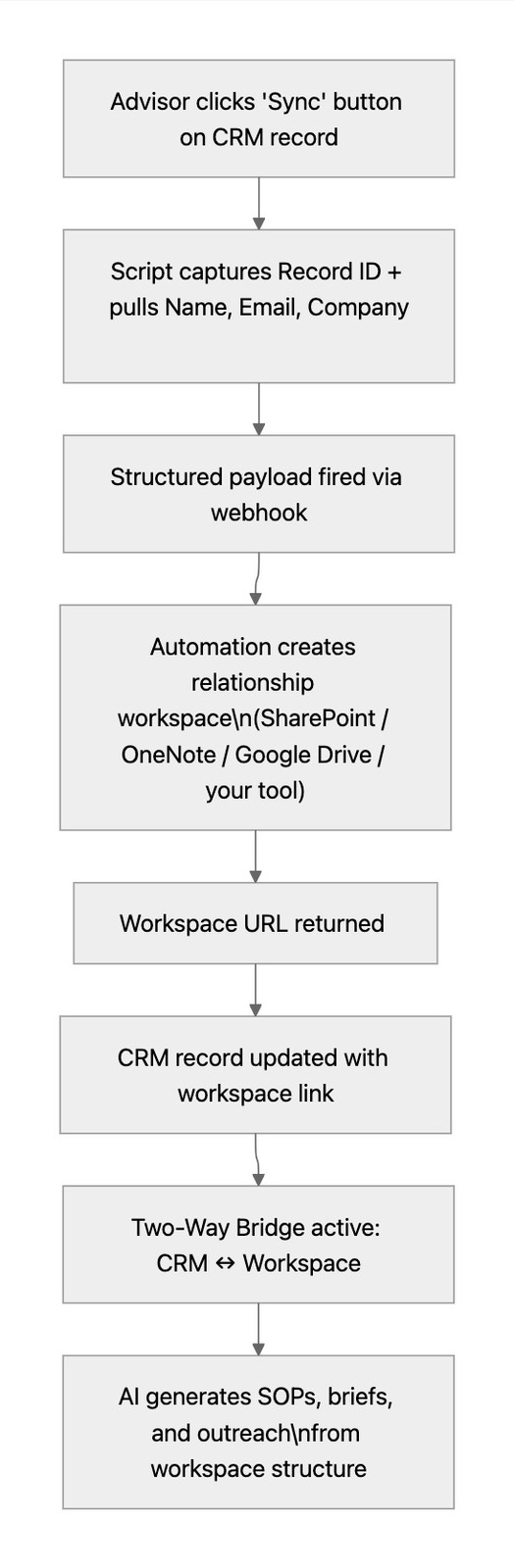
We added a single button to the top of every Lead record in the CRM. One click. No forms. No extra tabs. When pressed, the button:
- Captures the record ID from the lead you're currently viewing.
- Queries the CRM to pull name, email, and company.
- Fires a structured payload to the automation layer via webhook.
- Creates a relationship workspace in your document tool — pre-populated with the lead's information and a return link to the CRM record.
- Writes the workspace URL back to the CRM record automatically, so the link is live before you've switched tabs.
A notification confirms the moment it runs: "Syncing... refresh this record in a few seconds to see the link."
Why Manual Matters
The automation-first instinct is to make everything passive. But manual triggers have a real advantage in an advisory context: they signal intent.
When you click that button, you're making a deliberate decision — this lead is worth building context around. That act of selection changes how your team treats the record. It's no longer just another entry in a database. It's a relationship in progress.
It also solves the retroactive problem. Leads who entered your CRM before you had the Passive Listener in place can be synced to a workspace with a single click — no migration script, no mass update, no ops project.
The Intelligence Layer
Once the workspace is created, your AI layer can immediately start working with it — whether that's a built-in assistant in your document tool, Microsoft Copilot, Google Gemini, or a standalone AI connected to your workflow.
With a consistent workspace structure for every relationship, AI can:
- Draft an outreach strategy based on the lead's firm profile and background.
- Generate a structured action list for the next steps in your pipeline.
- Write a context-aware briefing for anyone on your team joining a discovery call.
- Create a Standard Operating Procedure for onboarding this prospect type.
The workspace isn't just storage. It's a starting point — a consistent surface that turns raw CRM data into executable strategy, without anyone having to manually assemble the context first.
Passive vs. On-Demand: Using Both
These two automations aren't competing — they're complementary. The Passive Listener ensures no lead falls through the cracks. The on-demand button ensures your team can act with intentionality when a relationship moves from cold to warm.
| Trigger | Best For | What It Creates |
|---|---|---|
| Passive Listener (automatic) | High-volume entry: web forms, referral lists, /lead command | Workspace for every lead, no action required |
| On-Demand Button (manual) | Intentional relationship-building: warm leads, pre-existing contacts, high-value prospects | Workspace on demand, with AI-ready structure and two-way CRM link |
Together, they mean your team is never choosing between speed and deliberateness. You get both.
What You Actually Need to Build This
The most common reaction when we walk through this system is: "We probably already have most of what we need."
You're right. Most firms do.
Here's the honest assessment. You almost certainly already have:
- ✅ A CRM (Wealthbox, Redtail, HubSpot, Salesforce, or Zoho)
- ✅ A team messaging tool (Slack or Microsoft Teams)
- ✅ A document system (Microsoft 365 / SharePoint / OneNote, or Google Workspace / Drive / Docs)
What most firms are missing:
- ❌ An AI parsing layer — something to convert natural language into structured CRM fields
- ❌ An automation middleware layer — something to connect the tools above when your CRM's native automations don't reach far enough
Depending on your stack, you may need one of these, or both. Here's the quick assessment:
| Your Stack | What You Already Have | What to Add | Estimated Added Cost |
|---|---|---|---|
| Zoho One | Zia AI (parsing) + Zoho Flow (automation) + Zoho Cliq (trigger) | Nothing — the full build runs inside your existing subscription | $0 |
| Microsoft 365 + any CRM | Power Automate (automation) + SharePoint/OneNote (workspace) | A ChatGPT integration via Power Automate or Zapier for the AI parsing step | ~$20–30/month |
| Google Workspace + any CRM | Google Drive/Docs (workspace) | Make.com or Zapier (automation) + a ChatGPT step (parsing) | ~$20–50/month depending on volume |
| HubSpot | HubSpot Workflows (automation) + AI Breeze (some parsing capability) | A ChatGPT step via Zapier for reliable natural language parsing | ~$20/month |
| Slack-first teams | Slack slash commands (trigger) | Zapier or Make.com (automation) + ChatGPT step (parsing) | ~$30–50/month |
The point: in every scenario, you're adding one or two tools — not rebuilding your stack. The infrastructure cost is a rounding error compared to the ops time and missed leads it eliminates.
If you're on Zoho One, the math is even simpler: the entire build runs inside what you're already paying for.
The ROI Math (Run It for Your Firm)
Here's a simple calculation. Conservative numbers — adjust for your reality.
| Variable | Conservative Estimate |
|---|---|
| New contacts entered per week | 20 |
| Average manual entry time per contact | 4 minutes |
| Weekly hours saved | 1.3 hours |
| Annual hours saved | 68 hours |
| Ops associate fully-loaded hourly cost | $35/hour |
| Annual labor cost savings (Automation 1 alone) | $2,380 |
| Add Automations 2 and 3 (workspace sync) | $3,000–$6,000 in recovered context time |
| Total estimated annual value | $5,000–$8,000+ |
The labor savings are meaningful for a lean firm — but they're not the real number. The real number is the leads that didn't get entered before this system existed. The advisors who handed over business cards that sat in a pile for three days. The follow-up emails that never went out.
One recovered prospect engagement at a typical RIA retainer rate covers the cost of this entire implementation many times over. And the infrastructure to run all three automations costs less per month than most firms spend on coffee for the office.
How This Works Across the Top RIA CRMs
The architecture translates across every major CRM platform. The trigger, the AI parsing step, the duplicate logic, and the workspace sync all port — the tools change, the outcome doesn't.
| CRM | Market Position | Native Automation Depth | Build Effort |
|---|---|---|---|
| Zoho CRM | The integrated stack play — full Zoho One suite | High — Zia AI + Flow + Cliq all included | ✅ Lowest; entire build runs natively |
| Wealthbox | The "Modern" Choice — clean UI, fast-growing | Low — simple by design, limited native automation | 🟢 Easy with Zapier + ChatGPT step |
| Redtail (Orion) | The Industry Standard — massive market share | Low — automations are rigid and rule-based | 🟡 Buildable with Make.com middleware |
| Salesforce FSC | The Enterprise Choice — scales to any size | High — Agentforce + Flow Builder, but complex | 🟡 Doable; requires admin involvement |
| HubSpot | The Marketing-First Choice — growing in advisory | Medium — strong workflows, AI Breeze layer | 🟢 Clean build with Zapier + ChatGPT |
| Advisor Engine | The Compliance-First Choice — workflow-heavy | Low — API exists, no native AI automation | 🟡 Buildable with middleware |
Wealthbox
Wealthbox users pride themselves on simplicity — and that same simplicity is the gap. The platform doesn't offer native AI parsing or deep automation, but its API is clean and well-documented, which makes it one of the easiest ports.
The build path:
- Trigger: Slack or Teams slash command
- AI layer: ChatGPT via Zapier — this is the one addition most Wealthbox firms need
- Logic: Zapier multi-step Zap for duplicate checking and conditional record creation
- Action: Wealthbox "Create Contact" via REST API
If you're on Wealthbox with Slack already, you can likely have Automation 1 running in a weekend.
Redtail
Redtail is the market-share leader at smaller shops, but its native automation is limited. Deduplication logic has to be built externally, and the platform's triggers are narrower than most.
The build path:
- Trigger: Slack or Teams slash command → webhook
- AI layer: OpenAI via Make.com
- Logic: Make.com scenario with conditional branches for duplicate checking
- Action: Redtail API for contact creation
This is buildable — it just requires more scaffolding than Wealthbox. Plan for a consulting engagement rather than a self-serve weekend project.
Salesforce FSC
Salesforce has every tool needed: Flow Builder, Einstein AI, and Agentforce can all theoretically replicate this architecture natively. The constraint is configuration complexity and cost — Salesforce's version of "simple" typically involves an admin and a multi-week timeline.
The build path:
- Trigger: Slack Bolt or Zapier
- AI layer: OpenAI GPT-4o for parsing (more reliable than Agentforce for this use case)
- Action: Salesforce API for Lead/Contact creation
For FSC firms, the right engagement is architecture design and build oversight, not plug-and-play. You likely already have a consultant or admin involved — the conversation is scoping what this looks like in your specific environment.
🧭 The bottom line: The architecture — natural language input → AI parsing → conditional CRM logic → workspace sync → audit trail — works on any platform with an API. The only question is how much middleware you need between your existing tools and how much of that middleware you already have.
What's Coming Next
This system was designed to grow. The core interactions stay exactly the same. The intelligence behind them gets smarter.
Here's what's on the build roadmap:
Confirmation back to the team. After the script runs, it posts a message back to the channel: "✅ 3 leads processed. 1 duplicate updated. 2 new records created." Right now the system works silently — the feedback loop closes it.
Keyword-based campaign tagging. If the input includes a phrase like "FPA Annual Conference" or "referral from Mike Chen," the script tags the record with that campaign automatically. Source attribution without any extra steps.
Instant nurture sequence trigger. A new lead created through the system can immediately kick off a CRM workflow — send a connection email, create a follow-up task, assign to the right advisor. The window between meeting someone and reaching out shrinks from days to minutes.
Business card image parsing. Photograph a business card, send the image to the command, and OCR + AI extracts and enters the contact. No typing at all.
Where This Fits in the Bigger Picture
If you've read The AI Divide in Wealth Management Is Already Here, you already know where this is headed. The firms pulling the highest multiples aren't doing it with better advisors or bigger marketing budgets — they're doing it with operational infrastructure that compounds. Fourteen use cases doesn't happen overnight. It happens use case by use case, starting with the ones that solve the most painful problems first.
CRM entry, relationship context, and on-demand sync are three of those. They're the foundation. They're also the ones that immediately change how your team experiences their tools — from friction to flow.
Three down. Eleven to go.
Why This Matters Beyond the Tool
The automation itself is not magic. AI-powered CRM entry isn't a new concept. There are third-party tools that do versions of this.
What matters is the decision that leads to building it.
We looked at a painful manual process and asked: Why are we still doing this by hand?
That question is the actual competitive advantage. Not the script. Not the AI prompt. The willingness to look at something slow and expensive and refuse to accept that it has to stay that way.
The firms that are winning on operations in 2026 aren't the ones with the most sophisticated technology. They're the ones that have built a culture of asking that question — and actually doing something about the answer.
Every advisory firm has three to five processes right now that are exactly like this. Time-consuming, error-prone, manually executed, and completely automatable with tools already in the building. The business card pile is just the one we decided to start with.
Is This Right for Your Firm?
If any of the following are true, the answer is probably yes:
- Your ops team spends meaningful time on CRM data entry each week
- You regularly find duplicate records or incomplete contact information in your CRM
- Leads from networking events or referrals don't always make it into the system reliably
- Your team already uses Slack or Teams — and your CRM has an API (almost all of them do)
- You have a document system your team actually uses (SharePoint, Google Drive, OneNote) that isn't connected to your CRM
- You want a concrete, demonstrable example of AI improving your operations — not AI for AI's sake, but AI solving a real problem with a real ROI
This isn't a $100,000 technology initiative. For most firms, the infrastructure cost is one Zapier or Make.com subscription — $30 to $50 a month. For firms already on Zoho One, it's zero. The build is measured in days, not quarters. And the payback period is measured in weeks, not years.
📩 Want to talk about building this for your firm?
We're happy to walk you through the architecture, assess your current stack, and scope what a build would look like for your specific tools. No obligation — just a straight conversation about whether it makes sense.
Reach out directly: heath@trugrowth.consulting
Or connect on LinkedIn and mention this article.